Hi,
I’ve been experimenting with Monty for 2-D object recognition on the MNIST digits and would appreciate your advice on pushing the accuracy and speed higher.
What I changed so far
- Principal-curvature stage
- Replaced the 3-D quadric fitting with a 2-D Hessian-based approach.
- Tangential vectors (Hessian eigen-vectors) are fed into
pose_vectors[1:3].
- Point-normal vector
- In 2-D every patch shares the same “out-of-plane” normal, so I fix
pose_vectors[0] = (0, 0, 1).
- In 2-D every patch shares the same “out-of-plane” normal, so I fix
- Environment
- Adapted
SaccadeOnImageEnvironmentfor flat images.
- Adapted
- Dataset split
- 60 samples per digit (0–9).
- 30 for training
- 60 (the full mini-set) for evaluation.
- 60 samples per digit (0–9).
Current results
Accuracy ≈ 55 %
Avg. recognition latency ≈ 1.2 s per image (0.025 s per each step)
My target is ≥ 90 % accuracy at ≥ 13 FPS.
Questions & points for discussion
- LM configuration
- Are there recommended LM hyper-parameters (tolerance, max match distance, etc.) that typically boost performance on small 2-D datasets?
- Rotation ambiguity (6 ↔ 9)
- Would it be sensible to suppress 180° pose hypotheses during matching, or is there an existing mechanism to disambiguate such mirror digits inside Monty’s LM?
- Any other proven tricks for 2-D use-cases—e.g., descriptor dimensionality reduction, alternative KD-tree settings—that you have found effective?
Thanks in advance for any guidance!
Best regards,
Below are my code snippets
------------------------------------------------- experiment configuration --------------------------------------------
mnist_training = dict(
   experiment_class=MontySupervisedObjectPretrainingExperiment,
   experiment_args=ExperimentArgs(
       n_train_epochs=1,
       do_eval=False,
   ),
   logging_config=CSVLoggingConfig(
               output_dir="mnist/log",
               monty_log_level="BASIC",
               monty_handlers=[BasicCSVStatsHandler],
           ),
   monty_config=PatchAndViewMontyConfig(
       # Take 1 step at a time, following the drawing path of the letter
       motor_system_config=MotorSystemConfigInformedNoTransStepS1(),
       sensor_module_configs=omniglot_sensor_module_config,
   ),
   dataset_class=ED.EnvironmentDataset,
   dataset_args=MnistDatasetArgs(),
   train_dataloader_class=ED.MnistDataLoader,
   train_dataloader_args = get_mnist_train_dataloader(start_at_version = 0, number_ids = np.arange(0,10), num_versions=30)
)

mnist_inference = dict(
   experiment_class=MontyObjectRecognitionExperiment,
   experiment_args=ExperimentArgs(
       #model_name_or_path=pretrain_dir + "/mnist_training/",
       model_name_or_path = "mnist/log/mnist_training/pretrained",
       do_train=False,
       n_eval_epochs=1,
   ),
   logging_config=CSVLoggingConfig(
           output_dir="mnist/log",
           monty_log_level="BASIC",
           monty_handlers=[BasicCSVStatsHandler],
       ),


   monty_config=PatchAndViewMontyConfig(
       monty_class=MontyForEvidenceGraphMatching,
       learning_module_configs=dict(
           learning_module_0=dict(
               learning_module_class=EvidenceGraphLM,
               learning_module_args=dict(
                   # xyz values are in larger range so need to increase mmd
                   max_match_distance=5,
                   tolerances={
                       "patch": {
                           "principal_curvatures_log": np.ones(2),
                           "pose_vectors": np.ones(3) * 45,
                       }
                   },
                   # Point normal always points up, so they are not useful
                   feature_weights={
                       "patch": {
                           "pose_vectors": [0, 1, 0],
                       }
                   },
                   # We assume the letter is presented upright
                   initial_possible_poses=[[0, 0, 0]],
               ),
           )
       ),
       sensor_module_configs=omniglot_sensor_module_config,
   ),
   dataset_class=ED.EnvironmentDataset,
   dataset_args=MnistDatasetArgs(),
   eval_dataloader_class=ED.MnistDataLoader,
   eval_dataloader_args = get_mnist_eval_dataloader(start_at_version = 0, number_ids = np.arange(0,10), num_versions=60)
)
------------------------------------------------- experiment configuration --------------------------------------------
------------------------------------------- SaccadeOnImageEnvironment----------------------------------------
class TwoDimensionSaccadeOnImageEnvironment(EmbodiedEnvironment): # by skj for 2D image evaluation
   def __init__(self, patch_size=10, data_path=None):
       self.patch_size = patch_size
       self.rotation = qt.from_rotation_vector([np.pi / 2, 0.0, 0.0])
       self.state = 0
       self.data_path = data_path
       if self.data_path is None:
           self.data_path = os.path.join(os.environ["MONTY_DATA"], "mnist/samples/trainingSample")
       self.number_names = [
           a for a in os.listdir(self.data_path) if a[0] != "."
       ]
       self.current_number = self.number_names[0]
       self.number_version = 1

       self.current_image,self.current_loc = self.load_new_number_data()

       self.move_area = self.get_move_area()

       # Get 3D scene point cloud array from depth image
       self.current_scene_point_cloud =0
       self.current_sf_scene_point_cloud =0
       self._agents = [
           type(
               "FakeAgent",
               (object,),
               {"action_space_type": "distant_agent_no_translation"},
           )()
       ]
       self._valid_actions = ["look_up", "look_down", "turn_left", "turn_right"]

   @property
   def action_space(self):
       ……
   def add_object(self, *args, **kwargs):
	……

   def step(self, action: Action):

       if action.name in self._valid_actions:
           amount = action.rotation_degrees
       else:
           amount = 0

       if np.abs(amount) < 1:
           amount = 1
       # Make sure amount is int since we are moving using pixel indices
       amount = int(amount)
       amount = 1

       query_loc = self.get_next_loc(action.name, amount)
       self.current_loc = query_loc

       patch = self.get_image_patch(
           self.current_image, self.current_loc, self.patch_size
       )
       #print(action.name)

       # patch : (H, W) uint8, 0=배경·>0=글자
       h, w = patch.shape
       yy, xx = np.mgrid[0:h, 0:w]
       zz = np.zeros_like(xx, dtype=np.float32)

       # 글자(픽셀 값 > 0)를 semantic_id=1 로 표시
       sem_id = (patch > 0).astype(np.float32)
       semantic_3d = np.stack([xx, yy, zz, sem_id], axis=-1) \
               .astype(np.float32) \
               .reshape(-1, 4)

       sensor_frame_data = semantic_3d.copy()

       # ── 깊이 맵 : 0.5(전경) / 1.0(배경) ───────────────────────
       depth = np.where(patch > 0, 0.5, 1.0).astype(np.float32)
       # ── world_camera : 단순 평면이므로 단위 행렬 ───────────────
       world_camera = np.eye(4, dtype=np.float32)
       obs = {
           "agent_id_0": {
               "patch": {
                   "depth": depth,
                   "semantic_3d": semantic_3d,
                   "sensor_frame_data": sensor_frame_data,
                   "world_camera": world_camera,
                   "rgba": np.stack([patch, patch, patch], axis=2),
                   "pixel_loc": self.current_loc,
               },
               "view_finder": {
                   "depth": self.current_image,
                   "semantic": np.array(patch, dtype=int),
               },
           }
       }
       return obs

   def get_state(self):
       ……
   def switch_to_object(self, number_id, version_id):
       ……
   def remove_all_objects(self):
       ……

   def reset(self):
       self.step_num = 0
       patch = self.get_image_patch(
           self.current_image, self.current_loc, self.patch_size
       )
       depth = np.ones((patch.shape[0],patch.shape[1]))
       obs = {
           "agent_id_0": {
               "patch": {
                   "depth": depth,
                   "semantic": np.array(patch, dtype=int),
                   "rgba": np.stack(
                       [patch, patch, patch], axis=2
                   ),  # TODO: placeholder
                   "pixel_loc": self.current_loc,
               },
               "view_finder": {
                   "depth": self.current_image,
                   "semantic": np.array(patch, dtype=int),
               },
           }
       }
       return obs

   def load_new_number_data(self):
       ……
   def load_depth_data(self, depth_path, height, width):
       ……
   def process_depth_data(self, depth):
       ……
   def load_rgb_data(self, rgb_path):
       ……
   def get_move_area(self):
       ……
   def get_next_loc(self, action_name, amount):
       ……
   def get_image_patch(self, img, loc,patch_size):
       ……
   def close(self):
       ……
------------------------------------------- SaccadeOnImageEnvironment----------------------------------------
--------------------------------------------sensor_modules.py-------------------------------------------------------
  @staticmethod
   def get_hessian_eigens(img_patch: np.ndarray, center:int, σ=1.0):
       f = cv2.GaussianBlur(img_patch, (0,0), σ)       # 소음 완화
       fxx = cv2.Sobel(f, cv2.CV_64F, 2, 0, ksize=3)
       fyy = cv2.Sobel(f, cv2.CV_64F, 0, 2, ksize=3)
       fxy = cv2.Sobel(f, cv2.CV_64F, 1, 1, ksize=3)
       H   = np.array([[fxx.flat[center], fxy.flat[center]],
                       [fxy.flat[center], fyy.flat[center]]])
       λ, V = np.linalg.eigh(H)              # λ0 ≥ λ1 정렬
       idx  = np.argsort(-np.abs(λ))
       return λ[idx][0], λ[idx][1], V[:,idx][:,0], V[:,idx][:,1], True
   ####################### by skj for 2D processing

   def extract_and_add_features(
           self
           features: dict,
           gray_patch: np.ndarray,        # (H, W)  ─ SIFT 등 형상 계산용
           rgba_patch: np.ndarray,        # (H, W, 3)
           depth_patch: np.ndarray,       # (H, W)  ─ 가짜 깊이 0.5/1.0
           center_flat_idx: int,          # row * W + col
           center_rowcol: int,            # 패치 중앙 row == col
           sem_mask: np.ndarray,          # (H, W)  ─ on-object 마스크
       ):
       # ────────────────────────────────────────────────────────────
       # 1.  형상-특징 (Morphological)
       # ────────────────────────────────────────────────────────────
       k1, k2, v1, v2, valid_pc = self.get_hessian_eigens(gray_patch, center_flat_idx)
       normal = np.array([0.0,0.0,1.0])
       morphological_features = {
           "pose_vectors": np.vstack([
               #np.append(grad_vec, 0.0),     # z=0 padding
               normal,
               np.append(v1, 0.0),
               np.append(v2, 0.0),
           ]),
           #"pose_fully_defined": pose_fully_defined,
           "pose_fully_defined": bool(abs(k1-k2) > self.pc1_is_pc2_threshold)

       }
       # ────────────────────────────────────────────────────────────
       # 2.  비-형상 feature (RGBA, HSV, Depth 통계)
       # ────────────────────────────────────────────────────────────
       # 중심 픽셀 좌표
       c = center_rowcol
       if "rgba" in self.features:
           features["rgba"] = rgba_patch[c, c]

       if "hsv" in self.features:
           rgb = rgba_patch[c, c] / 255.0
           hsv = skimage.color.rgb2hsv(rgb[np.newaxis, np.newaxis, :])[0, 0]
           features["hsv"] = hsv

       if "min_depth" in self.features:
           valid = depth_patch[sem_mask] < 1.0   # on-object
           features["min_depth"] = float(depth_patch[sem_mask][valid].min()) \
               if valid.any() else np.nan

       if "mean_depth" in self.features:
           valid = depth_patch[sem_mask] < 1.0
           features["mean_depth"] = float(depth_patch[sem_mask][valid].mean()) \
               if valid.any() else np.nan

       if any("curvature" in f for f in self.features) and valid_pc:
           if "principal_curvatures" in self.features:
               features["principal_curvatures"] = np.array([k1, k2])
           if "principal_curvatures_log" in self.features:
               features["principal_curvatures_log"] = log_sign(np.array([k1, k2]))
           if "gaussian_curvature" in self.features:
               features["gaussian_curvature"] = k1 * k2
           if "mean_curvature" in self.features:
               features["mean_curvature"] = (k1 + k2) / 2

       invalid_signals = False # 법선 계산 실패가 없으므로
       return features, morphological_features, invalid_signals


   def observations_to_comunication_protocol(self, data, on_object_only=True):
       patch_dict = data #by skj
       # 1) 회색 패치 (H,W) ─ 그래디언트‧헤시안 계산용
       gray_patch = patch_dict["rgba"][:, :, 0].astype(np.float32) # by skj
       h, w = gray_patch.shape # by skj
       center_rowcol  = h // 2 # by skj
       center_flat_idx = center_rowcol * w + center_rowcol # by skj

       obs_3d = data["semantic_3d"]
       sensor_frame_data = data["sensor_frame_data"]
       world_camera = data["world_camera"]
       rgba_feat = data["rgba"]
       depth_feat = data["depth"].reshape(data["depth"].size, 1).astype(np.float64)
       # Assuming squared patches
       center_row_col = rgba_feat.shape[0] // 2
       # Calculate center ID for flat semantic obs
       obs_dim = int(np.sqrt(obs_3d.shape[0]))
       half_obs_dim = obs_dim // 2
       center_id = half_obs_dim + obs_dim * half_obs_dim
       # Extract all specified features
       features = dict()

       if "object_coverage" in self.features:
           # Last dimension is semantic ID (integer >0 if on any object)
           features["object_coverage"] = sum(obs_3d[:, 3] > 0) / len(obs_3d[:, 3])
           assert (
               features["object_coverage"] <= 1.0
           ), "Coverage cannot be greater than 100%"

       rgba_patch  = patch_dict["rgba"]
       depth_patch = patch_dict["depth"]
       sem_mask    = (patch_dict["semantic_3d"][:, 3].reshape(gray_patch.shape) > 0)

       features, morph_feats, invalid = self.extract_and_add_features(
               features,
               gray_patch,
               rgba_patch,
               depth_patch,
               center_flat_idx,
               center_rowcol,
               sem_mask,
       )

       # 3) on_object 판정은 semantic_3d 의 4번째 값 사용
       sem_3d = patch_dict["semantic_3d"]

       # ── 중앙 픽셀의 3D 좌표(x,y,z=0) ─────────────────────────
       obs_center = sem_3d[center_flat_idx]        # [x, y, z, semantic_id]
       x, y, z = obs_center[:3]                    # z는 0
       semantic_id = obs_center[3]
       #print(semantic_id)
       # on_object 플래그
       morph_feats["on_object"] = float(semantic_id > 0)

       observed_state = State(
           location=np.array([x, y, z]),
           morphological_features=morph_feats,
           non_morphological_features=features,
           confidence=1.0,
           use_state=bool(morph_feats["on_object"]) and not invalid,
           sender_id=self.sensor_module_id,
           sender_type="SM",
       )
       return observed_state
--------------------------------------------sensor_modules.py-------------------------------------------------------
 I think
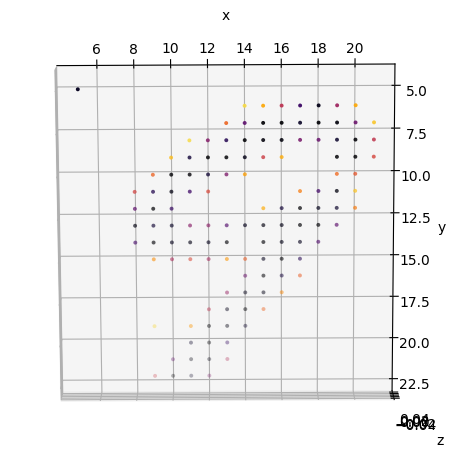
 Here is an example code sample to help see the “models” learned by Monty, and what that might look like for a YCB object.
 )
)


 Evidence not updating
 Questions
 Note on graph models


